Have Us: Call You Back

Call Us: UK: +44 1937 541 553

Email Us: info@smarterbusinessprocesses.com

Other Options: Contact Us

Smarter training adjusted to suit your real needs

At Smarter Business Processes we offer a wide variety of Smartsheet training courses and packages.

Learn More

Our team of certified consultants provides training and remote support to clients around the globe, improving their Project Management, Workflow and Process Management.

Smarter Business Processes is Cyber Certified

Emma Stevens

Office Manager

Emma has 27 years of financial and customer experience and brings processes and order to our office.

Emma's customer service knowledge ensures all of our clients office enquiries are dealt with professionally, efficiently and quickly. She will leave no stone unturned to get to the bottom of a query!

When not at her desk Emma enjoys spending time with her husband and daughter as well running Brownies and Rainbows for Girlguiding UK in her local area.

Etienne Mermillod

Software Development Manager

Etienne is a seasoned ASP.NET Core Full Stack Developer. He takes great pride in building world-class applications while carefully considering the needs of its users and ease of use.

Originally from France, Etienne now calls Canada Home, where he is part of SBP Canada as a member of the API Solutions Development Team.

Etienne is a well-seasoned traveler and has visited many countries where he usually takes the path less traveled in order to backpack around and soak in the local cultures.

When not coding away, you may expect Etienne to be playing with his huge and fluffy dog Indianna or gaming away on League of Legends

David Bower

Smartsheet, Airtable and AppSheet Consultant

David is a hugely experienced Consultant, Customer Care Specialist and Client Account Manager.

In his spare time, David plays guitar, is learning to ride a motorcycle and, when it’s not too cold, can often be found tinkering in the garage. He also intends to learn to play the piano too - one day

Debbie Sawyer

Chief Smartsheet Solutions Officer (CSSO)

BSc (Hons) Computing, ITIL Foundation, Smartsheet Certified User, Aligned Sales Certified and Professional Services Certified.

Seasoned Smartsheet consultant and Training professional, Debbie’s creativity, attention to detail, willingness to deliver solutions to fully meet customer requirements and her personable manner earn her excellent client feedback.

When not working, Debbie likes to relax by spending quality time with her family. Living in the New Forest sees her taking many walks through the woods and down to the sea fronts at Lepe and Calshot. Debbie is also a keen hula hooper and has been hooping now for more than 7 years! She owns at least 10 hoops and enjoys a great workout helping her friend to run a hula hoop fitness class.

Dr James Harris

Chief Technology Officer

An experienced IT professional, James' prior work spans diverse environments from the white heat of launching information systems in one of the world's busiest airports, to industry leading tech startups. He also has extensive experience as a Finance Manager. James brings a keen insight and and flair for problem solving to every project.

Outside of work, James writes comedy, and has had many television credits over the past couple of decades on shows such as Horrible Histories and Russell Howard's Good News. He retains a burning ambition to be as funny as his wife and daughter.

Ph.D. Biochemical Physics, IT and Accounting professional.

Gwen Rymill

Communications Director

Co-founder of Smarter Business Processes, Gwen’s multi tasking roles include ensuring our clients receive the very best in customer care, while responsible for sales and marketing and partner liaison. Just don’t expect to get the cup of tea she promised you!

Away from work Gwen enjoys cycling, pilates, tap dancing and just loves baking.

Richard Rymill

CEO

Co-Founder and Lead Consultant, Richard set up SBP in response to worldwide demand from businesses wanting to implement their own Smarter Business Processes. His rapidly expanding team of experienced Smartsheet and AppSheet Consultants and Trainers share the company's values of achieving improved efficiencies and collaboration by putting people first and releasing them from unnecessary repetitive activities so they can enjoy their work again and focus on what matters to them.

When not at his desk, Richard can be found cycling, swimming and when the opportunity permits, sailing and flying.

Smarter Dashboards

Built for you…

Every feature in Smarter Dashboards is a direct response to our clients’ needs.

Easy to use interface
– Different views for different audiences
– Live in-dashboard filtering

– Edit data directly
– Scalable pricing

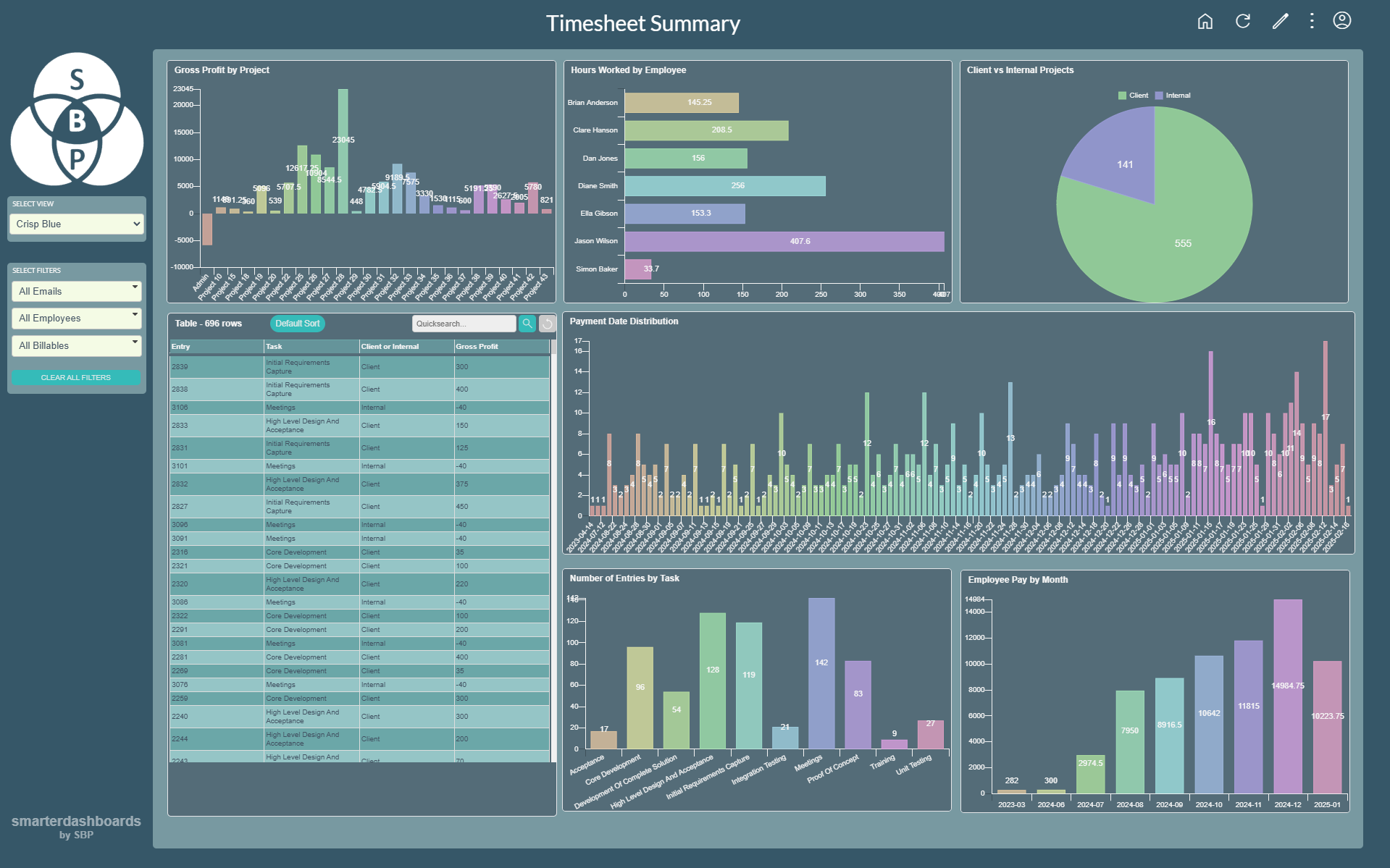
Use Smarter Dashboards to analyse, filter, edit and share your live data quickly and easily. Harness the power of data visualisation through a single pane of glass.

What our customers say:

“[The] custom dashboard and intake form have streamlined our workflows and improved overall efficiency. [It] provides a clear, real-time overview of our content scheduling, which aids in better decision-making. Additionally, the intuitive intake form has simplified the submission process, reducing errors and saving time.

We highly recommend SBP to any organization looking to optimize their business processes.”

Kelly Carmichael

Sr. Director, Global Content Services, Mood Media


Dynamic Filtering 
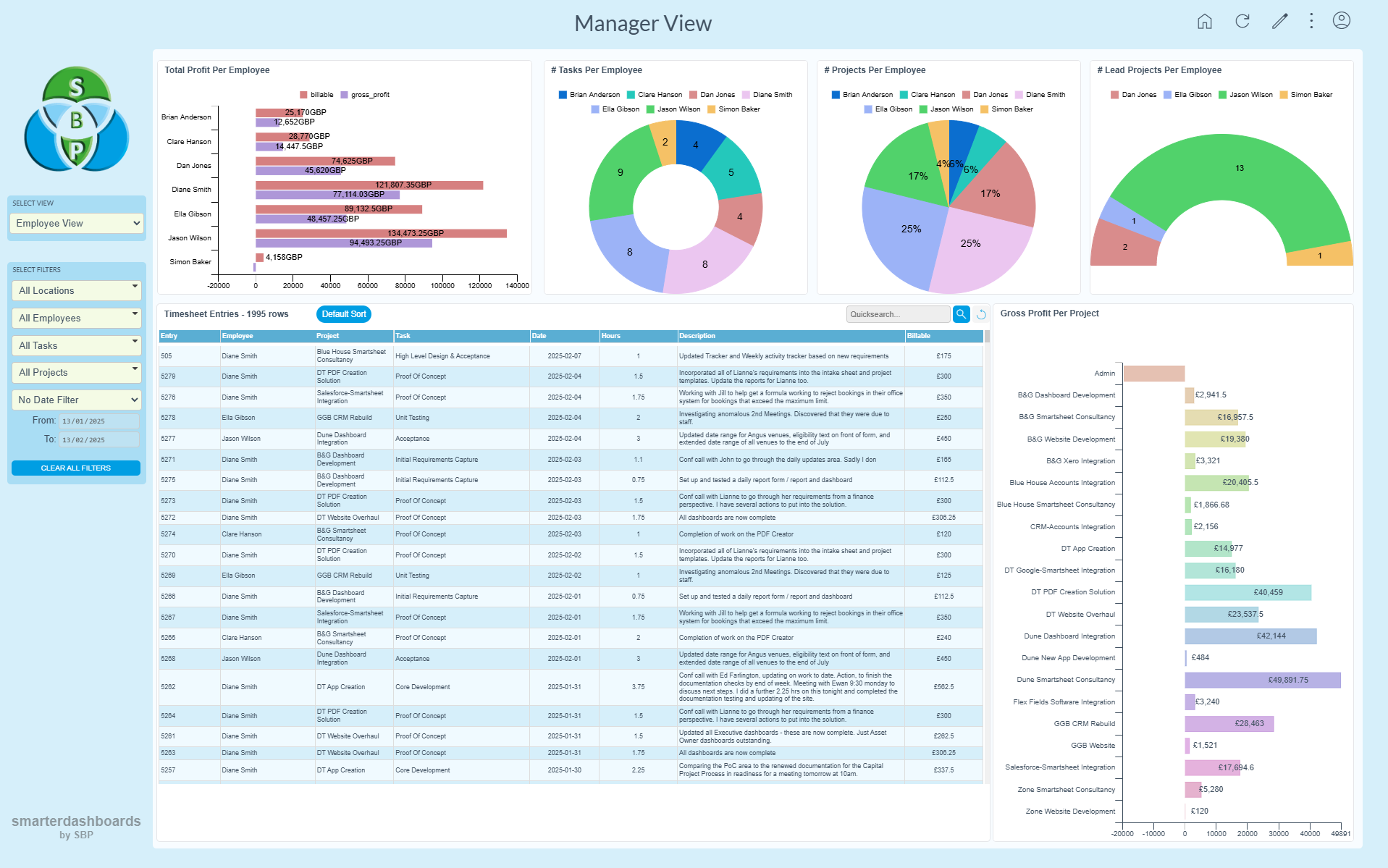
Slice your data in multiple directions simultaneously and gain access to insights in real time. Save days worth of admin time by not having to create and maintain separate dashboards for each different slice.

Live Data
The data in Smarter Dashboards is live, rather than taken from an hourly or daily batch run, enabling more agile decision making.

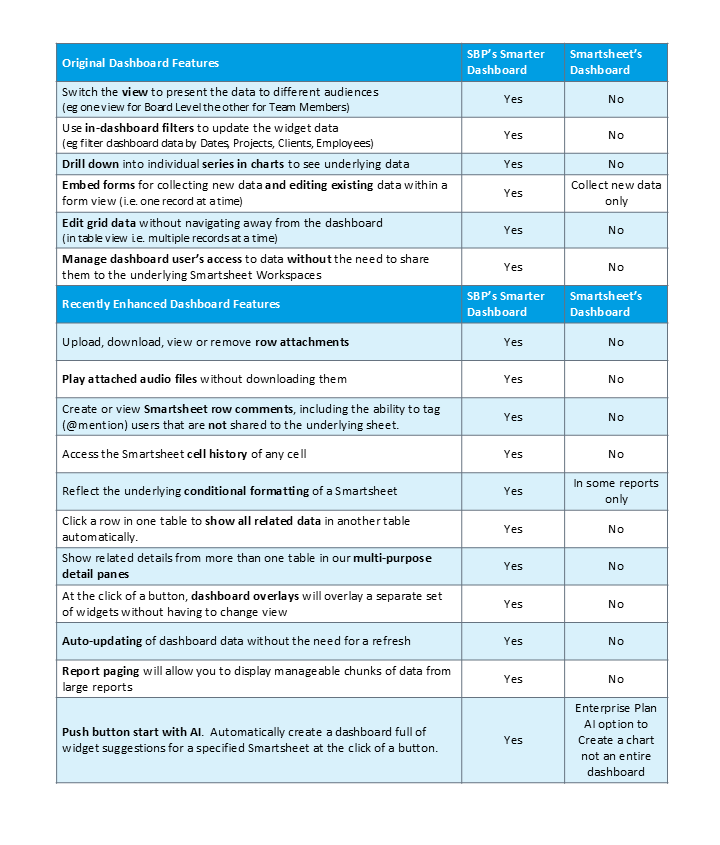
Edit in dashboard
Edit your data there and then, in the dashboard, by clicking on a table cell.

User Management
Fully control user roles and access to data.

Less time, less stress, more answers.

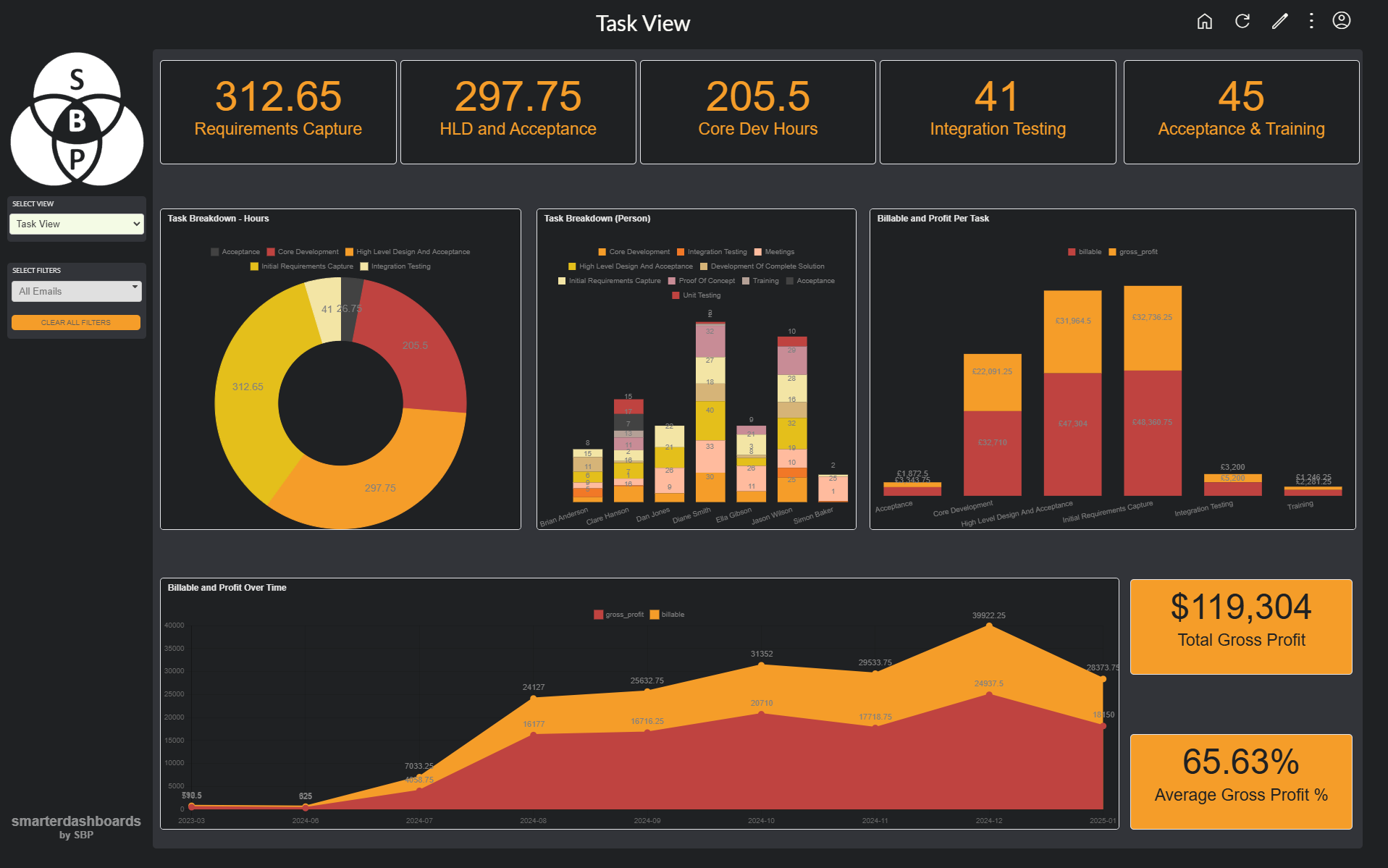
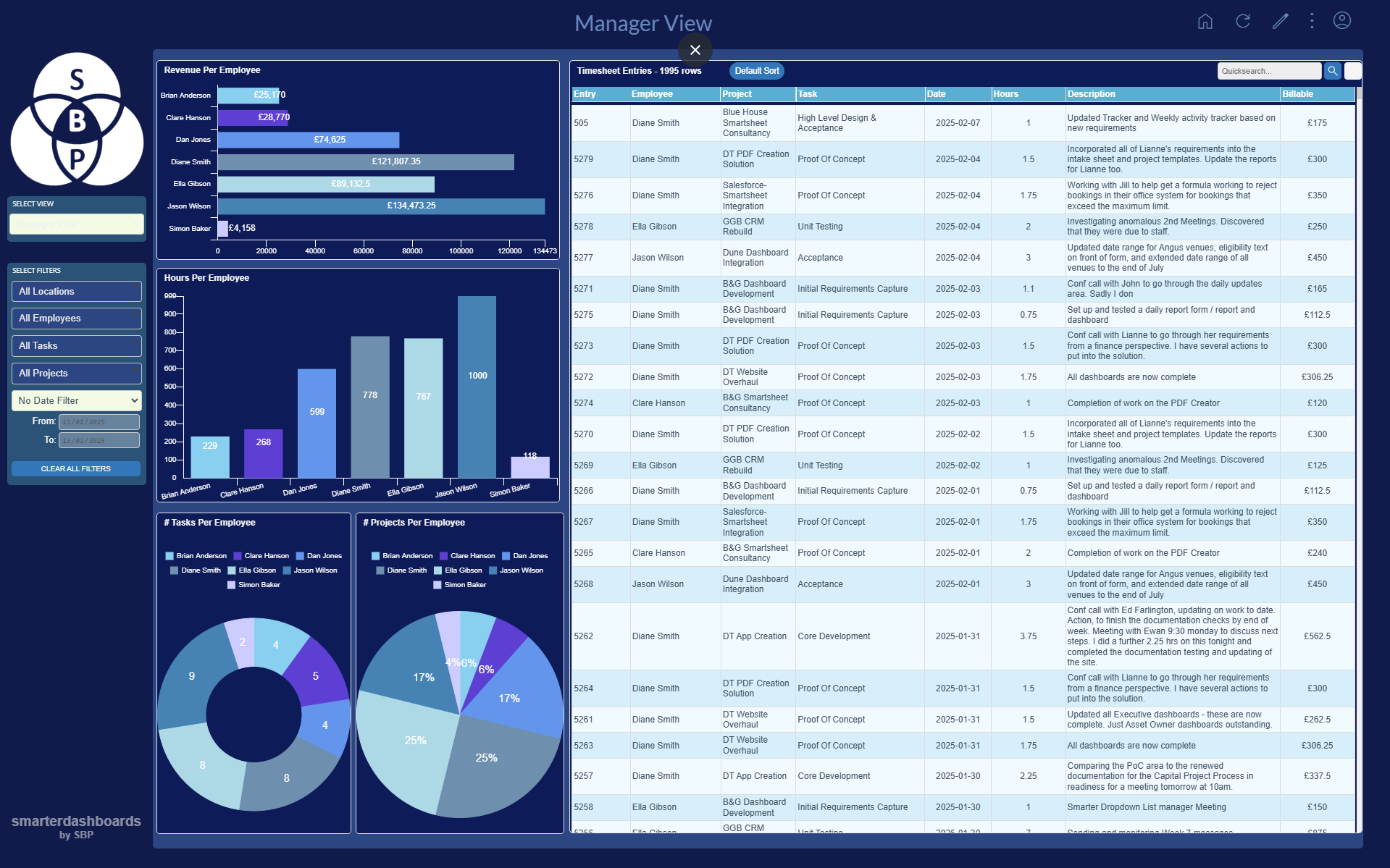
Stylish and informative dashboards – customisable for your needs

Other Key Features

AI Dashboards
Create entire dashboards with one click, or use the results for inspiration to create your own charts. 

Detail Pane
Click a row in a table to show more row details in a side pane. Reuse these multi-purpose detail panes for multiple tables, or to show row comments or attachments.

Themes
Select a colour theme to suit your dashboard or customise it to meet your needs.

Dynamic Tables
Click a row in one table and see the related data filtered in another table.  Database-like one-to-many functionality.

Smartsheet Integration

Access Smartsheet Sheets and Reports
Create stunning dashboards from Smartsheet sheets and/or Smartsheet reports. You can use multiple sources on one dashboard view.

Smartsheet Comments and Attachments
View and create row comments, including tagging people so they will receive notifications. View, upload, download and remove row attachments.

Smartsheet Cell History
Interrogate a cell’s Smartsheet history within a Smarter Dashboard table.

Smartsheet Conditional Formatting
Reflect the conditional formatting of the underlying Smartsheet in Smarter Dashboard tables.

Watch a Smarter Dashboards demonstration:

What our customers say:

Smarter Dashboards is a must-have solution for any organization looking to optimize their Smartsheet data.

Creating comprehensive dashboards is a breeze …  allowing teams to focus on more strategic tasks.

Diane Martell

Deputy Director, Peace4Kids

Some Frequently Asked Questions

How do I get started?
Just head over to www.smarterdashboards.net  If you have a Smartsheet account, you can just sign in with that. Then simply point Smarter Dashboards to the sheets or reports you want to visualise, and you’re away.

Can I have a free trial?
Absolutely. You can have a 14 day trial with no obligation whatsoever. If you need longer to properly evaluate the product, or to get the right people in the room to give you the thumbs up, talk to us and we can work something out.

Can I have some help setting up my dashboard?
You certainly can. We offer an hour of free consultancy to help you get started.  There is also a Getting Started video that leads you through the creation of a standard dashboard view. If you would like more assistance, we can offer an expert consultancy package, where we will analyse your data and set your dashboards up for you in quick order.

Can I customise my dashboards?
The dashboard owner (and anyone they make an admin) can add, change and remove views, charts and tables, customise the colour scheme, specify which users can see what, amongst many other aspects.

What data sources can Smarter Dashboards integrate with?
Smarter Dashboards currently integrates with Smartsheet, SQL and Google sheets.
Airtable is on the product roadmap.

What features are included in the subscription?
The full lists of features are here: https://smarterdashboards.net/plandetails. As you can see, there are 3 subscription tiers, depending upon what you need from your dashboard, and you can pay annually or monthly.

Can we add new features?
Yes you can. You can either suggest features (see below) that we can add to our product roadmap or, if you need something NOW, we can create it for you – for a fee, of course! So if you require custom development, for example to add an unusual chart type, add new third party integration options or whatever your needs might be, we will work with you to make your Smarter Dashboards exactly what you need.

Can you create a form in Smarter Dashboards?
With Smarter Forms, yes you can.  Smarter Forms need to be quoted separately, as they can be simple to set up, but equally, they can be very complex, depending on your needs. So we quote for each Smarter Form on an individual basis. They are fully integrated with Smarter Dashboards and include full conditional logic and as much customisation as you need.

How is user feedback incorporated into future updates?
Everything about Smarter Dashboards has been created as a result of user feedback. We are always actively looking to expand the product, and have a feedback link built into the interface so that we can collate our users’ requests. Each request is weighted according to the development time required, alongside an assessment of the broader users needs. Basically, this means that quick and easy things, and things that most clients are likely to want, go to the top of the list.

What our customers say:

“[Our Smarter Dashboard] has simplified the maintenance of this important data. It can now be visualised in a dashboard that is easily accessible and allows the scientists to have asset data real-time.

Global Pharma Lab Manager

Smarter Dashboards help you manage data in a dynamic setting

  • Build rich dashboards quickly
  • Filter and edit – manage your live data directly within the dashboards
  • Flexibility – move easily between views via simple navigation and clickable charts
  • Stylish output – business-ready views for easy and effective live presentations
  • Always current – know with real time data your reports and analytics are always up to date

What our Smarter Dashboards can do for you in a live setting

  • Drill down to any data subset by clicking on the relevant graph or chart
  • Edit data inline within tables, directly updating the underlying Smartsheets

What our Smarter Dashboards can do for you

  • Create handy, management-ready live snapshots based on any parameters you need
  • Present your data with pie and bar charts, multi axis line charts, scatter charts, bubble charts, polar area and more!
  • Provide different views for different user groups, allowing output to be tailored to the user

USE CASE

  • Create a single view that will show different data depending on the logged-in user
  • Allow users to edit data directly within the dashboard, which will then update the underlying Smartsheet data

USE CASE

If you have a large amount of data across many Smartsheets, we can sync these sheets to a SQL database, and drive the Smarter Dashboard from the database – allowing speedy access to hundreds of thousands of rows of data

USE CASE

If you need to view data from a secondary Smartsheet within your Smarter Dashboard, you can link this secondary data to the primary data via a key and it will filter and drill down in just the same way as the rest of your dashboard