









Business Process
Automation Consultants

The Top 5 Smartsheet Apps for Marketers

Social media, email marketing, landing pages, blog writing, PR outreach — marketers wear a lot of hats and are constantly juggling different projects with various teams. And, they’re always looking for tools and apps to simplify their marketing efforts.
But, the irony is that using dozens of apps actually makes you even less productive. You don’t have a central location for all your information — everything is spread out between different places and it can be challenging to stay in sync.
Supercharge Marketing Productivity
That’s where Smartsheet can help. Marketers choose Smartsheet to centralize their work, using it like their homebase, then they connect to key apps for additional features. All the essential information stays in one place, but can also be exported to certain apps to supercharge marketing productivity.
Here are five Smartsheet apps to help marketers work more efficiently and save time:
1. Manage email lists with MailChimp
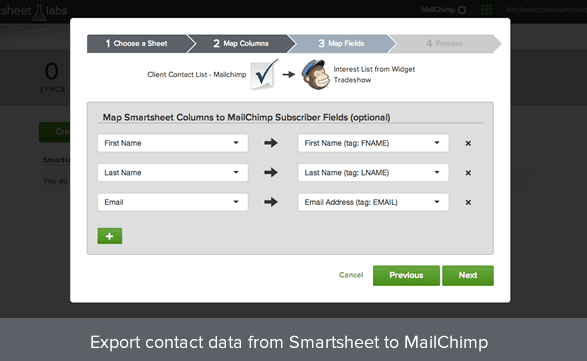
When you have multiple people managing email subscriber lists, there is always the worry that lists are inaccurate or not up-to-date. With the MailChimp integration, you can work with your team to update, change, and collaborate on subscriber details in Smartsheet, and merge all the information to your lists in MailChimp. No more worrying about staying up to date. Manage email lists with MailChimp + Smartsheet
2. Nurture your leads with Marketo

Have a centralized location to track leads in Smartsheet, then export that data to Marketo. Review, update, and make notes on your lead list in a sheet, then send the most updated information to Marketo for email campaigns and outreach. You can do a one-time export or schedule an on-going Smartsheet-to-Marketo synchronization. See how Marketo + Smartsheet works
3. Create an invoice with Harvest

Whether you’re a consultant, freelancer, or work in an agency, invoicing is a regular part of the marketing function. With the Harvest integration, you can create invoices in less than 60 seconds. Track billable hours in a Smartsheet to keep everyone aware of progress and status, then when you’re ready to create an invoice, simply export your time tracking data to Harvest. Make invoicing easy with Harvest + Smartsheet
4. Organize ideas with Evernote
Use Evernote to manage product launches, take meeting notes, and organize ideas for marketing campaigns. Then, turn those ideas into an actual plan in Smartsheet. Attach from Evernote and add notes directly to Smartsheet tasks, assign owners, and add due dates. Sync from Evernote and create task lists, collaborative projects, or archive ideas. Share ideas with Evernote + Smartsheet
5. Visualize your data with Charts

Instantly create charts or graphs for client presentations or pitches. Track marketing leads, email open rates, social media followers, press placements, and more in Smartsheet, then quickly turn the data into customizable, shareable charts. Visualize your data with Charts + Smartsheet
One Tool to Rule Them all
From managing and syncing email lists to quickly creating invoices, Smartsheet Labs offers a variety of apps and integrations. The best part? You only need one tool to supercharge your productivity. Smartsheet is your homebase, and you have the power to customize it with your favorite marketing apps to truly make your life easier.
Click here to see all the Smartsheet apps and integrations.
Contact us about your Smartsheet apps and integrations requirements – we’d love to hear from you !


